


I have spent the past few months tinkering with turning a spare computer into a home server. Not necessarily because I needed a home server, but because I could, and I was interested. I was a near-total beginner regarding Linux and servers and networking, but I had nothing to risk going in blind. Armed with several YouTube videos and some old equipment, after a few more stupid mistakes than I’d like to admit, I successfully got a baby home server up and running.
At first, this was nothing more than an experiment. Everything I’m running you can do on a computer that, while not a potato, should be considered unremarkable. It’s a very bland, several-models-old Dell tower, the sort of thing you can easily find for under $100 on Marketplace, especially when large offices upgrade, a pleasant destination for wandering eyes—my wife gets home. “What are you doing?” I have the biggest grin you’ve ever seen. “It’s called a Beowulf cluster—”
There are a few different reasons to pursue a homebrewed server setup. The first is its classic reputation: mistrust of big tech. If you don’t want Google, Apple, or Microsoft owning your entire digital footprint, hosting everything on your personal machines is the logical option. This really wasn’t what motivated me, but I’m not here to tell you that’s a bad reason. We need people like you in the world; someone’s gotta read the terms and conditions.
Another reason, I suppose, is cost. But honestly the cost savings are negligible and are not guaranteed. Cloud storage is pretty cheap, and lots of places have free plans. You don’t need a powerful machine to run a home server, but what with the costs of hard drives and upgrades every five to seven years, along with the power costs and miscellaneous what-all else, you probably aren’t saving a ton of money versus paying for cloud storage. Unless the saving in question is sort of a principled stand for buying something once to own it as opposed to paying a subscription fee indefinitely, which is understandable, but goes back to reason #1: mistrust of big tech. 100 GB of storage on Google Cloud is $20/year. It’s fully backed up, it’s available anywhere, anytime. And while you could probably eventually save money if you need multiple terabytes of storage,1 the old joke that “Linux is free if your time is worthless” is, uh, making a real point. Unless you’re a power user (in which case this article isn’t worth your time either), there’s going to be a bit of a learning curve getting into this stuff. Yes, all the software is free. Yes, there are tons of YouTube videos to help you through it, and Linux has become much more beginner-friendly in the past decades. But that isn’t going to keep you from spending more time than you would like troubleshooting when something that is supposed to work doesn’t.2
But the final reason is something I hadn’t expected and hadn’t understood until getting into it myself. Even now, discussing the subject, I feel like a keeper of long-lost secrets, a preserver of hidden knowledge, a mother who happens to be antivax trying to open the eyes of the masses to the truth: you were never meant to “wash” your clothes that way. My secret, the secret Big Tech doesn’t want you to know, is this: open source *works better*. The open-source apps
Here is my main grievance. I remember growing up in the era of Windows XP and Vista. Back when desktops had a sole gigabyte of DDR2. Back when it was a flex to have two cores in your processor instead of one. I remember my dad telling me about this new thing they were coming out with, the “tablet computer.” It was a chore to restart the computer, because it took several minutes.
Now, we have exponentially more powerful machines in the palms of our hands. Storage, memory, and CPUs have all gotten faster, cheaper, and smaller. You would think, of course, that our user experiences have only improved! Our apps can run twenty times as fast, they can render, they can process, they can sort; all those lovely computer things can happen quicker and better.
Dear reader. If only it were so simple. You knew it had to be this way. You knew that access to such wonderful wings would only fly us closer to the sun. The heart of man is fickle, and the temptation was great. The new abilities of our new machines allowed our software to get sloppy. We could add so many new features, so many new integrations, so many new compatibilities.
And we did. And the Bloat came.
Windows 11 now has to preload File Explorer into memory. Essentially, File Explorer in 2026 takes too long to start up after you click on it. To solve this problem, Windows starts File Explorer before you click on it, loading it into memory so that it can be ready when you want it. We’re talking about file management here, one of the most basic tasks you ask your operating system to do. And no, that is not the end of 11’s well-documented grievances. I speak from some experience: my work laptop idles using six gigabytes of RAM. As in, no Chrome, no apps, just the operating system and all its friends-and-relations. You may argue that I shouldn’t expect my laptop, a nearly-eight-year-old Surface Pro 6, to run more recent software well. I submit that a Surface Pro 6 (4-core, i5) should be able to open File Explorer without ten seconds of buffering.
This is untenable. Twenty years ago, Windows XP operated systems that had 256 MB total. Yes, times have changed. There are more drivers, more security measures, higher resolutions, etc. But that is hardly an excuse. Burke wrote back in 1790 that there were no new discoveries to be made in the area of morality; well, I’m here in 2026 to tell you that there are no new discoveries to be made in the area of operating systems. An operating system needs to boot up your system, connect to your monitors, manage your files, and leave the rest to you. It’s your computer, not the other way around.
And we know this is possible, because that is what Linux does. My home server runs the TrueNAS OS, a lightweight Linux distro intended for small servers and network-attached storage. It uses about a gigabyte of RAM per terabyte of storage: 2. It also runs a bunch of apps in Docker containers, so my entire server setup idles at about 7 GB of RAM with everything going on. Oh, it’s not fair to compare a server OS to a desktop OS? Here’s my ThinkPad upon starting Linux Mint:

Again, my Windows 11 Surface idles at five gigabytes, directly upon booting up:
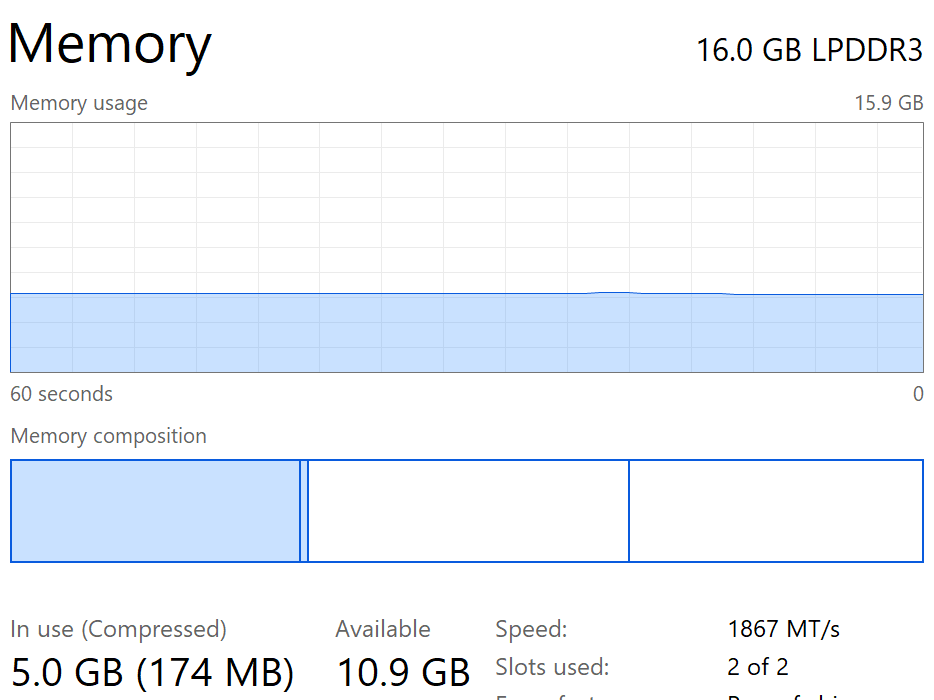
All that extra memory usage is memory I don’t get to use for whatever I happened to be using a computer. Part of my radicalization is as follows: I use my devices for a specific purpose. Yes, Windows 11 has additional features that bare bones Linux distros lack. If I wanted them, I could add them. Windows gives me no choice as to whether I want to be blessed with its benevolence: you’ll get the good with the bad, and the bad is starting to outweigh the good. Most of the excess is simply bloat: the echoes of thirty years of development catching up to Windows.
But the Bloat is not limited to operating systems. While Windows is a major grievance, this bloat has started to permeate everything. And once you start to notice it, it’s hard to turn back.
Many apps are essentially a bunch of databases: lots of records, lots of numbers, lots of calculations, lots of connectors. Email servers, for example, but also any sort of financial app, any sort of messaging app, etc. Basically any app whose purpose is “based on this, go look up this” as opposed to specialized apps that are actually doing something complex like rendering 3D graphics or videos or something. I have a special ire in my heart when such apps run poorly, for their functionality is one of the most basic things computers do. But a separate part of the problem, in our modern day, is the prevalence of Web Apps.
There was a shift a few years back towards making a lot of formerly desktop apps cloud-based. There are several reasons for this, good and bad. The advent of smartphones and tablets becoming end users’ main (or only) device, the convenience of cross-device sync, the preferred revenue model of subscription services; any or all of these played into this shift. But the shift is undeniable.
As my church treasurer, I use an old copy of QuickBooks Desktop, which hasn’t even been supported since 2021. I installed it off a DVD. The company file lives on my computer. All the app functionality happens on my computer. QuickBooks is a database app; all it’s doing is recording transactions and allowing me to view the transactions I’ve recorded. Nothing it’s doing requires intense computational power, so the app runs great! I click a button, and the menu pops up. I can scroll through years of historical transactions without lag; all those records are right there on my computer. The experience is great. The app does exactly what I need it to, without getting in the way.
At work, I use QuickBooks Online. This is the newest version of QuickBooks (it auto-updates every few months). You access it through a browser—you can access it from any computer with an internet connection, which is, on its own, a benefit. But what that means is that our QuickBooks file is not on any of the local computers where we’re doing the work. It’s on a hard drive in a data center somewhere…else. And we have to access that through the “cloud”. The cloud, of course, is not a real thing, but it’s a nebulous concept in most people’s minds. What having this file on the cloud means that instead of my data living on the computer in front of me, accessible as fast as a SATA cable can get it into RAM, the data is instead accessible across several hundred miles of fiber-optic cable. In Georgia somewhere, or Chicago. I don’t know. And it’s not clear why when everything is running on the cloud, instead of locally, everything has to take a couple extra beats to process. (This is tangentially related to the data center discourse, I suppose. But I will refrain3). Every time I pull a new report, that request has to go to the server, and all that data has to come back. Every time I scroll up in a list of transactions, those transactions have to load in. Internet connections have dramatically improved in recent years, but this still isn’t close to as snappy as the local QuickBooks Desktop experience (and it never can be). I’m typing this article in the Substack web client, and sometimes there’s a frustrating lag between my keystrokes and the result on the screen, because it’s constantly syncing with the server.
If multiple people are working on the same data from distant locations, cloud storage is a blessing. The Covid pandemic of remote work certainly benefited from its availability. But this QuickBooks example perfectly illustrated what I was coming to understand about the benefit of having apps run locally. It is far from the only example. There are droves of open-source projects out there by now, alternatives to Big Tech products made by people who had this same problem, ten years ago. It is a good time to be getting into home-server and open-source tech.
My server is running:
Operating System: TrueNAS
DNS Server / Ad Blocker: AdGuard Home
Tunnel (so I can reach it from the outside world): Cloudflared
Media Player: Jellyfin
Home Management: Home Assistant
Package Management: Portainer
File Sync: Seafile (think OneDrive or Dropbox)
Photo Library: I haven’t set it up yet, but Immich is essentially an open-source Google Photos
All of these are free (at least for a home license) and open-source. All of them do exactly what you need them to do, if you know what you’re doing. As mentioned, they all run on minimal hardware. Best of all, they all run on my local network, instantly accessible from any device. With a simple domain and Cloudflare tunnel, you can also access it from the Web, if necessary. And those features are only the beginning of what your home server could be: you can run whatever you want, which is exactly what you should be running.
There’s an additional feeling of accomplishment and satisfaction that stems from setting up your own cloud storage or “streaming” service, as opposed to merely renting one on the internet. But before you delete the two terabytes you have in Google Photos, there are a couple of caveats.
First, of course, is security. Any device connected to the outside world is vulnerable to hacking, to DDOS, etc, and network security is a complex world. There are tools out there for you to establish peace of mind, but it can’t be a guarantee. (Then again, big companies get hacked too, so it’s a bit of a pick-your-poison).
The second caveat is reliability. I have a RAID 1 mirror across two physical hard drives (each hard drive is a mirror copy of the other). But what that means is all that data is stored on those two physical drives. RAID gives you a backup if one fails, but if you ever lose both (house burns down, crazy power surge, etc), that data is gone forever. Cloud services like Google and OneDrive have to give you multiple levels of redundancy to guarantee you never lose data. (They lose it, occasionally, but not very often). So if all your data is going off the cloud, you’re going to want frequent backups on multiple hard drives in different locations, if that data matters to you at all. Always make sure you are confident in what you are doing before you start to take irreversible steps.
That, in a couple thousand words, has been my winding journey with home-server and open-source tech. It started as a mere passing interest and has become something I plan on using long-term, not only because I enjoy it (which I do) but also because there are multiple functionalities that are quite simply better than their cloud-subscription alternatives. It’s not going to be everyone’s cup of tea, which is perfectly fine. But the next time a spare computer happens by, don’t just throw it out. Throw a Linux distro on there and see what happens.
Like I said, not guaranteed. Storage is expensive, especially SSDs. And each additional drive needs more power, more backups, etc. The economies of scale catch up to you real quick.
It’s probably a permissions issue. It always is.
Such a based article. Welcome to the faith, brother. Remember to consult our Holy Book every once and a while: https://www.stallman.org/microsoft.html
You're speaking my language! I've been trying to get the hang of Linux Mint for a few months now, but I'm planning on trying another distro on my desktop. It was the Windows 10 end-of-life and the non-negotiable AI features on 11 that finally broke me.